
The ECHO Implementation.
How Nedia Lives Inside the ECHO System.

The last article explained what ECHO is and why I use it. Jeremy Wright - Marketer/ECHO built it. I implemented it. And somewhere in that process, I figured out that Nedia wasn’t an app: it was a protocol that could live inside a system like this.
This article is the how. What I actually built, what it took to get there, and whether it makes sense for you.
How this started
Not with a design decision. With a question.
I was in a session with ECHO, talking about the app, what it was, what had happened to it, where it might go. And somewhere in that conversation I asked, almost offhand: Could you read all my certificates and scanned documents and create a single document that consolidates everything?
ECHO said yes.
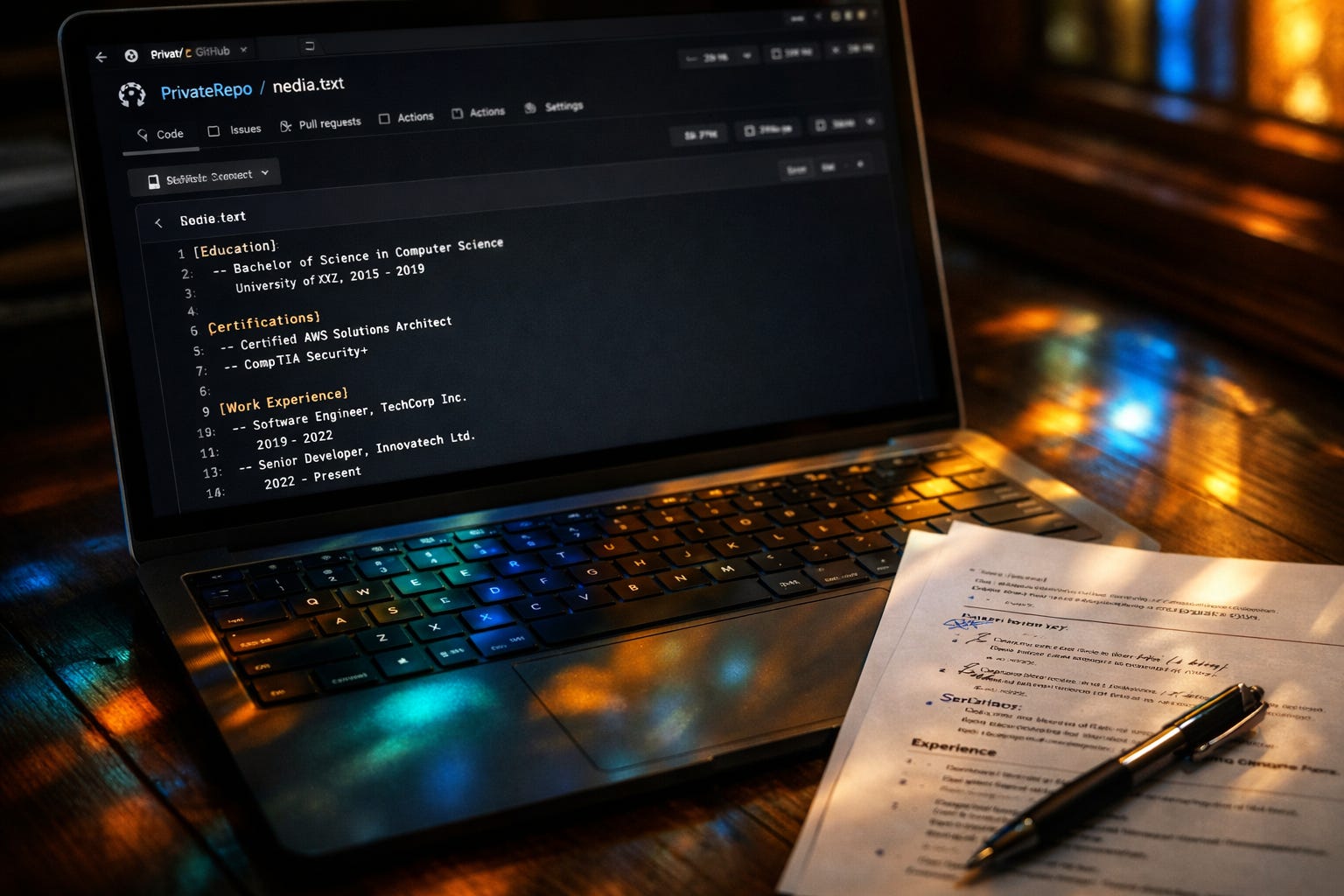
What came out of that session was nedia.txt: a structured file with my complete professional history: education, certifications, work experience, projects, context that doesn’t fit in a standard format. Everything organized so that ECHO could read it and work from it going forward.
That file is Nedia. Not the app. Not the platform. The document that holds the shape of what I’ve built, maintained in a repo that belongs to me.
Where Nedia lives
Not inside Claude.
That’s the first thing to understand. ECHO runs on Claude, but Nedia lives in a GitHub repository that belongs to me. A private repo. The file is mine: versioned, auditable, exportable. It doesn’t live in any platform’s servers.
When I need a CV for a specific opportunity, ECHO reads the file and generates it. When I finish a course or complete something significant, I add a line to the file. Next session, ECHO already knows.
The architecture
Three components, each doing a different job:
The GitHub repository: where Nedia lives. Also where ECHO’s memory lives: session logs, context files, notes from conversations worth keeping. Everything that needs to persist between sessions gets committed here. The repo is the continuity infrastructure.
The Claude Project: where the behavioral contract lives. The Project Instructions tell ECHO how to work with me: what to read at the start of each session, what protocols to follow. This is configuration, not data.
GitHub MCP in Claude Desktop: the bridge. MCP (Model Context Protocol) is what allows ECHO to actually open files in the repo, read them, and write to them in real time. Without this, ECHO has no access to the repo and the whole system just reverts to a standard stateless chatbot.
Remove any one of these and the system breaks.
The honest part about setup
I’m on Linux.
Configuring GitHub MCP on Linux was the most laborious step of the entire implementation. Claude Desktop doesn’t have official Linux support, so there’s a workaround involved. It’s doable if you’re comfortable searching for solutions and modifying configuration files manually. If not, it might be a hurdle.
On Mac or Windows the setup is more straightforward. Still takes time and follows documented steps. Not trivial, but the Linux path adds a layer that I want to name before you decide whether this implementation is for you.
What it costs
Claude Pro: $20/month. This gives you access to Projects.
GitHub: free for private repositories.
Claude Desktop: free.
Setup time: a few hours the first time. Building the ECHO system and the initial nedia.txt is the real investment. After that, maintenance is incremental. Add something when it happens. The system compounds.
A note on Claude Plans: free accounts can create up to five projects, but the full Project Instructions capability (what makes ECHO’s behavioral contract actually work) requires a paid plan. Free accounts also don’t have access to Opus within Projects. For this implementation to function as designed, Pro is the practical minimum.
How this works
The workflow has two phases:
Phase 1 Build once. You give ECHO your raw material: old CV versions, certificates, a description of what you actually did in each role, any professional context that matters. It organizes that into the nedia.txt.
This takes a few hours the first time. Less if your documents are reasonably organized. More if you’re like I was in December.
Phase 2 Generate on demand. Once ECHO has your profile in the nedia.txt, generating a CV for a specific opportunity takes minutes. You describe the role. ECHO pulls the relevant pieces. You review and adjust. Done.
No starting from scratch. No three-hour panic and lost opportunities.
What happens to your data
Your nedia.txt lives in your GitHub repository. Not in Anthropic’s servers. When ECHO reads it during a session, it processes the content in memory for that conversation. The content of your repo is not retained by Anthropic after the session ends.
You can verify this: Settings → Privacy → confirm training is disabled. Claude for Work accounts have this off by default.
IMPORTANT: GitHub is now using private repository data for AI training by default.
You'll need to manually opt out here: https://github.com/settings/copilot/features
Whether it actually works
In December I published an article about a three-hour CV panic. An opportunity I totally missed because I had fourteen CV files and none of them were current.
Last week, with nedia.txt built and ECHO knowing my full professional history, I needed a CV for an opportunity that came up fast. ECHO generated it using the Word Claude skill. I edited it slightly. I sent it immediately.
I got the opportunity.
No three-hour panic. No archaeology through email folders, old USB’s and photo albums. No version control hell.
That’s what the protocol is for.
Who this makes the most sense for
This implementation works best if:
You’re comfortable with GitHub, or willing to learn basic repo management
You’re on Mac or Windows — or on Linux and comfortable with manually editing.
Your professional history is complex: non-linear, multi-disciplinary, hard to compress into standard formats
You want memory that compounds over time, not a one-time document
Data sovereignty matters to you
It’s less suited if:
You need a single CV and don’t anticipate needing this again
The technical GitHub MCP setup is a barrier you’re not ready to cross right now
You're not comfortable giving a text-based AI your professional details
There are other implementations in this series. Some are simpler. Some trade control for accessibility.
If you’re just arriving: start with How an AI Refused to Let Me Forget I Was a Founder (what ECHO is, why I use it, and what it showed me about what I was already building). Or go back to The Whole Builder, where Nedia stops being an app and becomes a protocol.
What’s the piece of your professional history that’s hardest to put in a standard format? Not the gap you’re worried about — the thing that actually matters and has no field for it anywhere.
The part that matters most here isn't the architecture. It's the sequence. You built Nedia first — months of real work, real decisions, real context. Then you encoded what survived. nedia.txt isn't a template you filled in. It's an artifact of practiced judgment.
Most people try to start with the governance file. Define the rules, then do the work. It almost never holds. The constraints that stick are the ones extracted from experience, not imposed before it.
The three-piece architecture — persistent file, behavioral contract, MCP bridge — is clean. But the reason it works is because you knew what belonged in nedia.txt before you wrote it. That knowledge came from the months of building, not from the tooling.
"The system compounds." It does. But only after the operator earns the context worth compounding.